
A slow MySQL database rarely needs bigger hardware first. In most cases the gains come from a few slow queries, missing indexes and default settings that were never tuned for the workload. MySQL performance tuning is about finding those problems in the right order and fixing them one at a time.
There is also a timely reason to look at performance now. MySQL 8.0 reached end of life on April 30, 2026, and many teams are moving to MySQL 8.4 LTS, which is supported until 2032. An upgrade is the ideal moment to review configuration, because 8.4 also changes several InnoDB defaults.
Here are 12 fixes, roughly in the order we would try them, from finding slow queries to scaling reads.
Before You Start: Tune in the Right Order
- Queries and indexes first. They usually give the biggest improvement for the least cost.
- Configuration second. Memory, logging and connection settings.
- Architecture last. Replicas, caching, partitioning or more hardware.
Measure before and after every change, and change one thing at a time.
1. Turn On the Slow Query Log
The slow query log records every query that takes longer than a threshold you choose.
- Set slow_query_log = ON and start with long_query_time = 1 (one second), then lower it as you fix the worst queries.
- Summarise the log with pt-query-digest from Percona Toolkit or mysqldumpslow. They group similar queries, so you can see which ones cost the most time in total, not just which single run was slowest.
The MySQL documentation on the slow query log lists every related option.
2. Read Execution Plans With EXPLAIN and EXPLAIN ANALYZE
EXPLAIN shows how MySQL plans to run a query. EXPLAIN ANALYZE (MySQL 8.0.18 and later) actually runs it and shows real timings and row counts. Look for:
- type: ALL, which means a full table scan.
- A large gap between rows examined and rows returned.
- “Using temporary” and “Using filesort” on large result sets.
3. Index for Your WHERE, JOIN and ORDER BY Clauses
- Create composite indexes in the order your queries use them. MySQL can only use the leftmost columns of an index.
- Put columns used with equality conditions before columns used with ranges.
- A covering index contains every column a query needs, so MySQL never has to read the table rows.
- Remove unused and duplicate indexes, which slow down every write. The schema_unused_indexes and sys.schema_redundant_indexes views help you find them.
4. Write Queries the Optimizer Can Use
Small changes in how a query is written can decide whether an index is used at all.
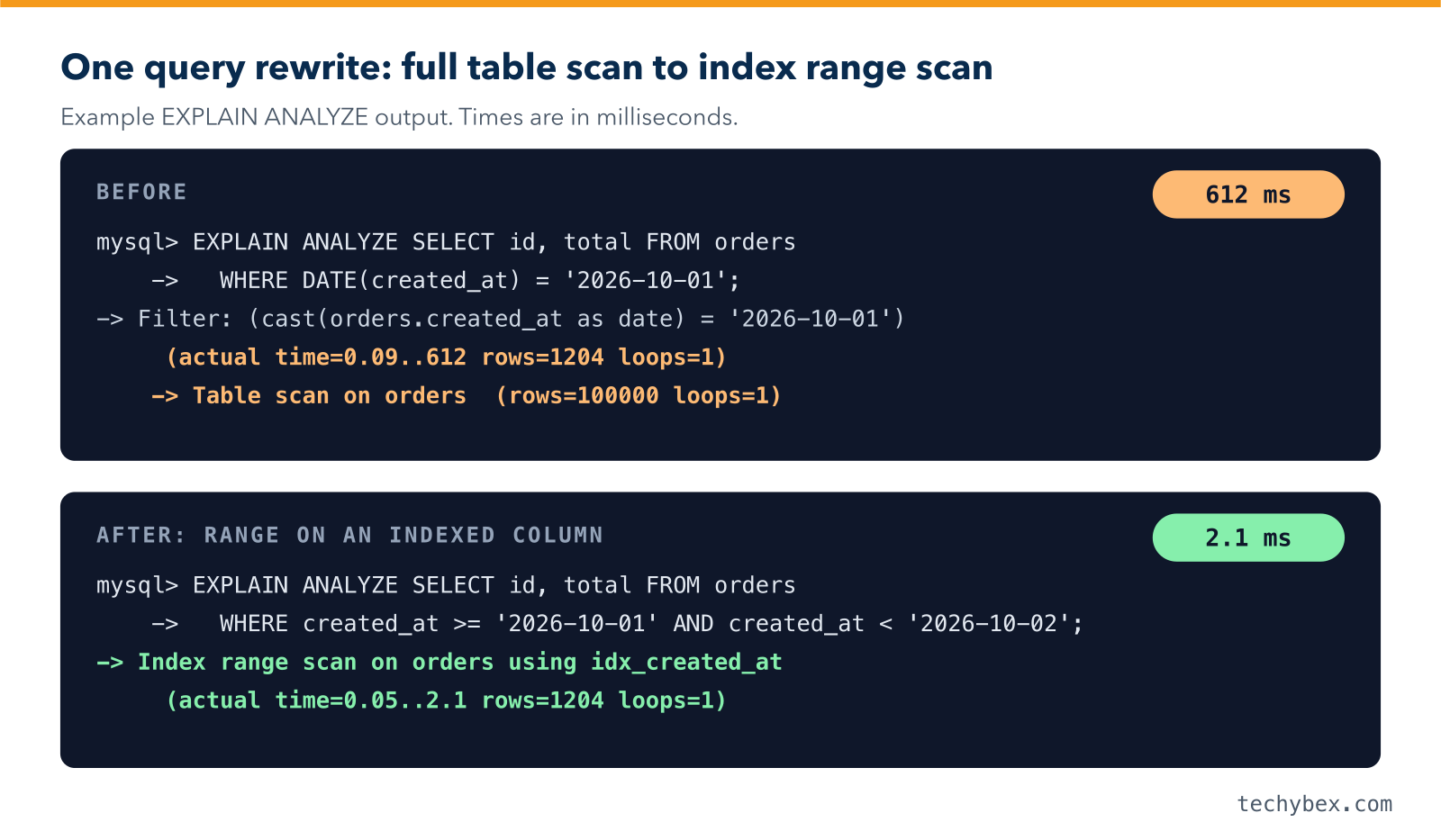
- Avoid functions on indexed columns. Replace WHERE DATE(created_at) = ‘2026-10-01’ with a range: WHERE created_at >= ‘2026-10-01’ AND created_at < ‘2026-10-02’.
- Avoid leading wildcards such as LIKE ‘%term’. Use full-text search for that need.
- Compare columns with values of the same data type to avoid implicit conversion.
- Select only the columns you need instead of SELECT *.
- Replace deep LIMIT … OFFSET pagination with keyset pagination (WHERE id > last_seen_id), which stays fast on page 1,000.
5. Size the InnoDB Buffer Pool
The buffer pool caches data and indexes in memory. It is the single most important MySQL setting.
- On a dedicated database server, innodb_buffer_pool_size is typically set to 60–75% of RAM, and up to around 80% on servers with plenty of memory.
- Check the ratio of Innodb_buffer_pool_reads (reads from disk) to Innodb_buffer_pool_read_requests (all reads). If disk reads are a noticeable share, the pool may be too small.
- The buffer pool can be resized online without a restart.
6. Size the Redo Log
From MySQL 8.0.30, innodb_redo_log_capacity replaces the older innodb_log_file_size and innodb_log_files_in_group settings. A redo log that is too small forces frequent checkpoints and causes write stalls under load. A common rule of thumb is enough capacity to hold roughly an hour of writes at peak.
7. Choose Durability Settings Deliberately
- innodb_flush_log_at_trx_commit = 1 (the default) gives full durability: every commit is safely on disk.
- A value of 2 is faster but can lose about one second of transactions if the operating system crashes.
- sync_binlog = 1 keeps the binary log safe for replication and recovery.
For financial, healthcare or order data, keep both at 1 and solve write performance with faster storage instead.
8. Manage Connections
Every connection uses memory, and thousands of idle connections waste resources.
- Set max_connections from your measured peak plus headroom, not an arbitrary large number.
- Use connection pooling in the application, or a proxy such as ProxySQL, instead of opening a new connection for every request.
- For very high connection counts, a thread pool helps. It is included in MySQL Enterprise Edition, Percona Server and MariaDB.
9. Tune Temporary Tables and Sorting
- If Created_tmp_disk_tables grows quickly, raise tmp_table_size and max_heap_table_size together, or better, fix the queries creating large temporary tables.
- MySQL 8 uses the TempTable engine for internal temporary tables. Its memory limit is set by temptable_max_ram.
- Do not raise sort_buffer_size globally by large amounts. It is allocated per session and can exhaust memory under load.
10. Keep Statistics and Tables Healthy
- Run ANALYZE TABLE after large data loads or deletes so the optimizer has accurate statistics.
- Use histograms (ANALYZE TABLE … UPDATE HISTOGRAM ON column) for non-indexed columns with skewed data.
- Use OPTIMIZE TABLE on tables with heavy deletes to reclaim space. It rebuilds the table, so schedule it off-peak.
- Use InnoDB for every table. MyISAM lacks crash recovery and row-level locking.
11. Scale Reads With Replicas and Caching
When a well-tuned single server is still not enough:
- Add read replicas and route read-only traffic to them with ProxySQL or MySQL Router.
- Cache frequent, rarely changing results in an application cache such as Redis. The old MySQL query cache was removed in MySQL 8.0.
- Archive old data or partition very large tables so active data stays small.
For synchronous, shared-nothing clustering, see our guide to MySQL NDB Cluster.
12. Monitor Continuously
Tuning only lasts if you keep watching.
- Use performance_schema and the sys schema, for example statement_analysis and sys.statements_with_full_table_scans.
- Use a monitoring tool such as Percona Monitoring and Management (PMM) or your cloud provider’s monitoring.
- Alert on slow query rate, replication lag, buffer pool hit ratio, connections and disk space.
Quick Reference: Key MySQL Settings
| Setting | What it controls | Sensible starting point |
| innodb_buffer_pool_size | Memory cache for data and indexes | 60–75% of RAM on a dedicated server |
| innodb_redo_log_capacity | Redo log size (MySQL 8.0.30+) | Enough for about an hour of peak writes |
| innodb_flush_log_at_trx_commit | Commit durability | 1 for critical data |
| sync_binlog | Binary log durability | 1 for critical data |
| max_connections | Maximum client connections | Measured peak plus headroom, with pooling |
| long_query_time | Slow query log threshold | 1 second, then lower |
| tmp_table_size and max_heap_table_size | In-memory temporary table limit | Raise together only if disk temp tables are frequent |
The MySQL 8.4 optimization guide covers each area in depth. If you are also weighing a switch of database engine, read our comparison of MariaDB vs MySQL.
How TechyBex Helps With MySQL Performance
TechyBex DBAs tune and manage MySQL 24×7 on-premises and on Amazon RDS, Aurora, Azure and Google Cloud. We analyse your slow queries, fix indexes and configuration, plan your move from MySQL 8.0 to 8.4 LTS, and set up monitoring so performance stays healthy.
Learn more about our Database Optimization and Consolidation and Database Managed Services.
Get a free MySQL performance review
Share your slow query log or monitoring data and our DBAs will send you a prioritised tuning report within 2 working days.
Frequently Asked Questions
1. What is the most important MySQL setting for performance?
innodb_buffer_pool_size. When the working set of data and indexes fits in memory, most reads avoid disk entirely. After that, query and index design have the biggest effect.
2. How do I find slow queries in MySQL?
Enable the slow query log and summarise it with pt-query-digest, or use performance_schema and the sys.statement_analysis view to rank queries by total execution time.
3. Does upgrading from MySQL 8.0 to 8.4 improve performance?
It can, but do not assume it. MySQL 8.4 changes several InnoDB defaults, for example turning off the adaptive hash index and change buffering by default. Benchmark your own workload before and after. The main reason to upgrade is that MySQL 8.0 no longer receives fixes.
4. Should I use MyISAM or InnoDB?
Use InnoDB. It supports transactions, row-level locking and crash recovery, and it is where all modern MySQL performance work happens.
The Order That Works
Effective MySQL performance tuning follows a clear order: find slow queries, fix indexes and query patterns, then tune memory, logging and connections, and only then scale out. Keep monitoring after every change. With that discipline, most MySQL databases get much faster without new hardware.