
MariaDB started life as a copy of MySQL, so the two still look alike: the same SQL dialect for everyday queries, the same client tools and many of the same connectors. Under the surface, they have been growing apart for more than fifteen years. Choosing between MariaDB vs MySQL today means comparing features, compatibility, high availability, licensing and cloud support, not just picking the more familiar name.
Below are the differences that matter in practice, followed by a simple way to decide.
A Short History
- 1995: MySQL is first released by the Swedish company MySQL AB, co-founded by Michael “Monty” Widenius.
- 2008: Sun Microsystems acquires MySQL AB.
- 2009: Concerned about Oracle’s planned purchase of Sun, Monty and other original developers fork MySQL to create MariaDB.
- 2010: Oracle completes its acquisition of Sun and becomes the owner of MySQL.
Today, Oracle develops MySQL, offering a free Community Edition and a paid Enterprise Edition. MariaDB is developed by the community under the non-profit MariaDB Foundation, with commercial products and support from MariaDB plc.
MariaDB vs MySQL at a Glance
Area |
MySQL |
MariaDB |
| Steward | Oracle | MariaDB Foundation (community) and MariaDB plc (commercial) |
| Server licence | GPLv2 Community Edition, plus commercial Enterprise Edition | GPLv2 |
| Release model | Long-term support releases (8.4 LTS, supported to 2032) plus innovation releases | Long-term support releases (for example 10.11 and 11.4) plus short-term releases |
| Default storage engine | InnoDB | InnoDB, plus Aria, ColumnStore, MyRocks, Spider and others |
| Built-in HA clustering | InnoDB Cluster (Group Replication, MySQL Router, MySQL Shell) | MariaDB Galera Cluster (synchronous multi-primary) |
| JSON | Native binary JSON data type | JSON stored as text with validation and JSON functions |
| Thread pool | Enterprise Edition only | Included in the free server |
| Temporal (system-versioned) tables | Not available | Available |
| Sequences | Not available (AUTO_INCREMENT only) | CREATE SEQUENCE supported |
| Oracle compatibility mode | Not available | sql_mode=ORACLE with PL/SQL support |
| Analytics | HeatWave (managed cloud service) | ColumnStore engine |
Compatibility: Is MariaDB Still a Drop-In Replacement for MySQL?
For older versions, largely yes. Moving from MySQL 5.5 or 5.6 to MariaDB was often a straight swap. Since MySQL 8.0, the two have diverged in important ways:
- Data files: MySQL 8 uses a transactional data dictionary that MariaDB cannot read. Moving from MySQL 8 to MariaDB requires a logical dump and reload, not an in-place switch.
- JSON: MySQL stores JSON in a binary format; MariaDB stores it as text. Most JSON functions work in both, but behaviour and performance can differ.
- Replication: the two products use different GTID formats, which limits replication between them.
- Authentication: MySQL 8 defaults to the caching_sha2_password plugin, which older clients and connectors may not support.
- SQL details: some functions, optimizer hints and system variables exist in only one of the two.
MariaDB publishes a detailed list of MariaDB vs MySQL compatibility differences. Check it against the features your application actually uses.
Performance
Neither database is faster in every case. Results depend on the workload, version, hardware and configuration, and benchmarks published by vendors tend to favour their own product.
Some differences can matter for specific workloads:
- MariaDB includes a thread pool in its free server, which helps workloads with very many concurrent connections. MySQL offers this only in Enterprise Edition.
- MySQL 8 brought major optimizer improvements, including hash joins and better handling of common table expressions.
- MariaDB offers extra storage engines, such as ColumnStore for analytics and MyRocks for write-heavy workloads with high compression.
The only reliable answer is to benchmark your own queries on both, using a tool such as sysbench plus a replay of real production traffic.
High Availability and Scaling
MySQL offers asynchronous and semi-synchronous replication, Group Replication, and InnoDB Cluster, which bundles Group Replication with MySQL Router and MySQL Shell for automatic failover. InnoDB ClusterSet extends this across data centers. MySQL NDB Cluster is a separate product for very high availability; read our overview of MySQL NDB Cluster.
MariaDB offers asynchronous and semi-synchronous replication and Galera Cluster, a synchronous multi-primary cluster where every node accepts writes. Galera needs at least three nodes and works best with short transactions, because conflicting writes are detected at commit time. MariaDB MaxScale is a popular proxy for routing and failover. It is released under the Business Source License, so check licensing for production use.
Licensing, Support and Cloud Availability
Both community servers are free under GPLv2, including for commercial use. Paid editions add support and extra features:
- MySQL Enterprise Edition adds features such as the thread pool, enterprise backup, audit, firewall and monitoring.
- MariaDB Enterprise Server comes with MariaDB plc support, while the community server already includes several features that MySQL reserves for its paid edition, such as the thread pool and an audit plugin.
In the cloud, MySQL has wider managed support: Amazon RDS and Aurora MySQL, Azure Database for MySQL, Google Cloud SQL and Oracle’s HeatWave. MariaDB is available on Amazon RDS and through MariaDB’s own cloud services. Microsoft retired Azure Database for MariaDB in September 2025, so Azure customers now run MariaDB on virtual machines or move to Azure Database for MySQL.
MariaDB vs MySQL: Which Should You Choose?
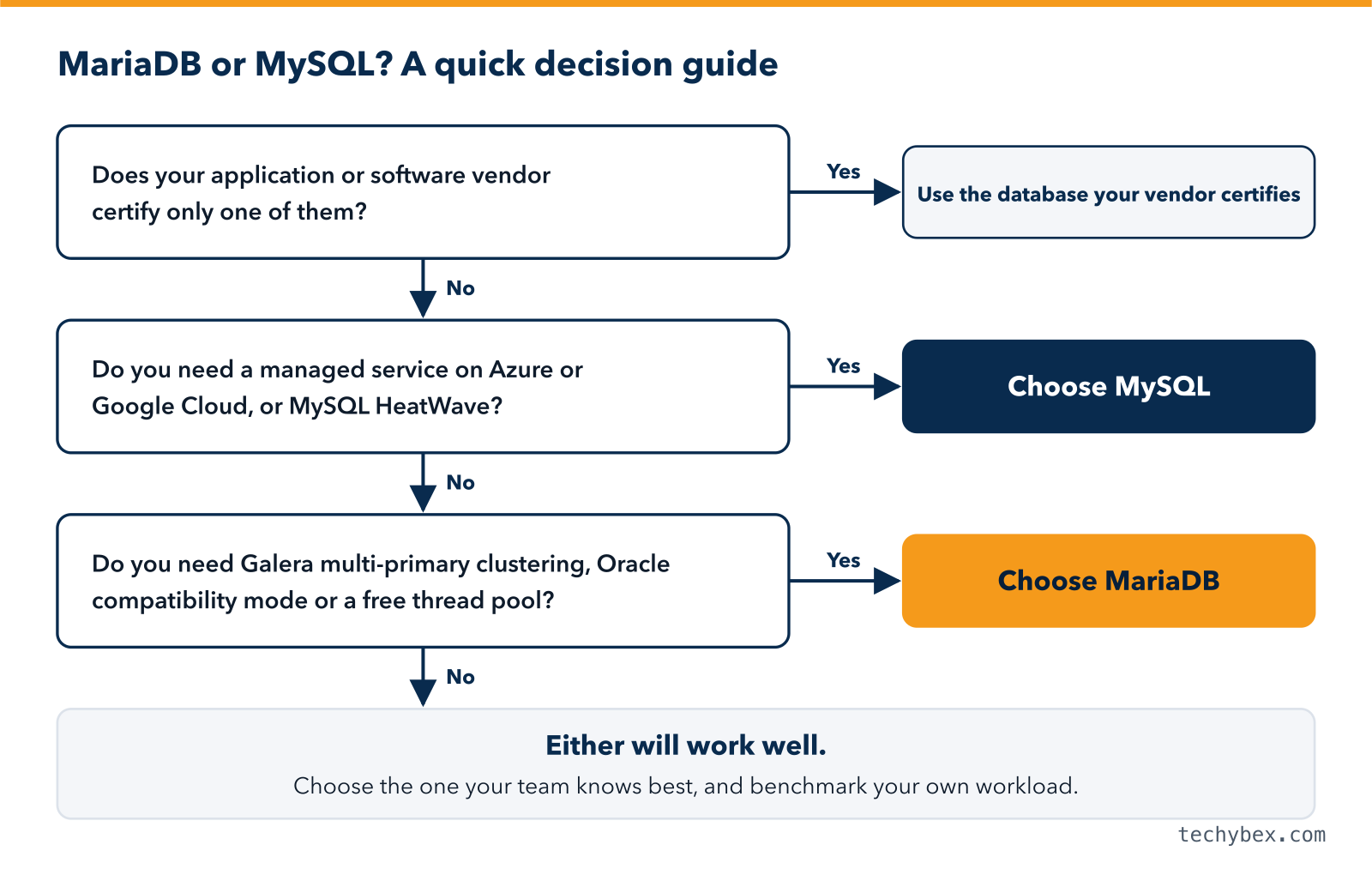
Choose MySQL if:
- Your application or software vendor certifies MySQL 8.x.
- You rely on MySQL-specific features such as the native JSON type, InnoDB Cluster or HeatWave.
- You want a fully managed service on Azure or Google Cloud, or Oracle support.
Choose MariaDB if:
- You want more enterprise features in the free edition, such as the thread pool, temporal tables, sequences and auditing.
- You want synchronous multi-primary clustering with Galera.
- You are moving away from Oracle Database and want help from MariaDB’s Oracle compatibility mode.
- Your Linux distribution ships MariaDB as its default MySQL-compatible server, as Debian does.
If you already run one of them successfully, switching rarely pays off on its own. Focus on tuning, upgrades and operations first. Our guide to MySQL performance tuning is a good place to start.
How to Migrate Between MySQL and MariaDB Safely
- Inventory the features, plugins, SQL modes and connectors your application uses.
- Check compatibility against the official differences list.
- Migrate with a logical dump using mysqldump or mydumper, then restore into the target.
- Test the application with production-sized data and real queries.
- Plan the cutover with replication where versions allow it, or a short maintenance window where they do not.
- Keep a rollback plan until the new system has run cleanly in production.
How TechyBex Helps
TechyBex manages both MySQL and MariaDB 24×7, including Galera clusters, InnoDB Cluster, Amazon RDS and Aurora. We help you choose the right engine, migrate safely between them, and keep performance and backups healthy afterwards.
See our Database Managed Services and Database Optimization and Consolidation.
Not sure whether MariaDB or MySQL fits your workload?
Our DBAs review your current setup and requirements and send a clear recommendation within 2 working days.
Frequently Asked Questions
1. Is MariaDB faster than MySQL?
Sometimes, depending on the workload. MariaDB’s free thread pool can help with many concurrent connections, while MySQL 8’s optimizer improves some complex queries. Benchmark your own workload before deciding.
2. Can I replace MySQL with MariaDB without changing my application?
For applications built on MySQL 5.x, often yes with testing. For MySQL 8 applications, expect some differences in JSON handling, authentication and SQL features, and plan a logical migration rather than a direct swap.
3. Is MariaDB free for commercial use?
Yes. The MariaDB server is licensed under GPLv2 and can be used commercially at no cost. Paid subscriptions add support and enterprise tools.
4. Which is better for WordPress, MariaDB or MySQL?
WordPress officially supports both. Choose based on what your hosting provider offers and which one your team can operate and support best.
The Bottom Line
MariaDB and MySQL share a common origin but are now distinct databases. MySQL offers Oracle’s backing, a native JSON type and wide cloud support. MariaDB offers more features in its free edition, Galera clustering and Oracle compatibility. Decide based on your application’s requirements, your cloud platform and your team’s skills, and test before you migrate.