
Apache Cassandra runs some of the largest data platforms in the world, and the project’s own case studies page lists companies such as Apple and Netflix among its users. It is built for huge write volumes, global scale and no downtime. It is also one of the easiest databases to choose for the wrong reason.
Below are the Apache Cassandra use cases where it is an excellent fit, the ones where it is a poor fit, and the modeling and operating rules that decide whether a Cassandra project goes well.
What Is Apache Cassandra?
Apache Cassandra is an open-source, distributed NoSQL database. It was created at Facebook, released as open source in 2008, and became a top-level Apache Software Foundation project in 2010.
Its key properties:
- Masterless: every node is equal, so there is no primary to fail.
- Linear scaling: add nodes to add capacity for both reads and writes.
- Multi-data-center replication built in, including across cloud regions.
- CQL (Cassandra Query Language): looks like SQL, but has no joins and limits which queries you can run efficiently.
The latest major release, Apache Cassandra 5.0, added Storage-Attached Indexes (SAI), the Unified Compaction Strategy and vector search. The Cassandra 5.0 announcement covers the details.
How Cassandra Works, in Plain Terms
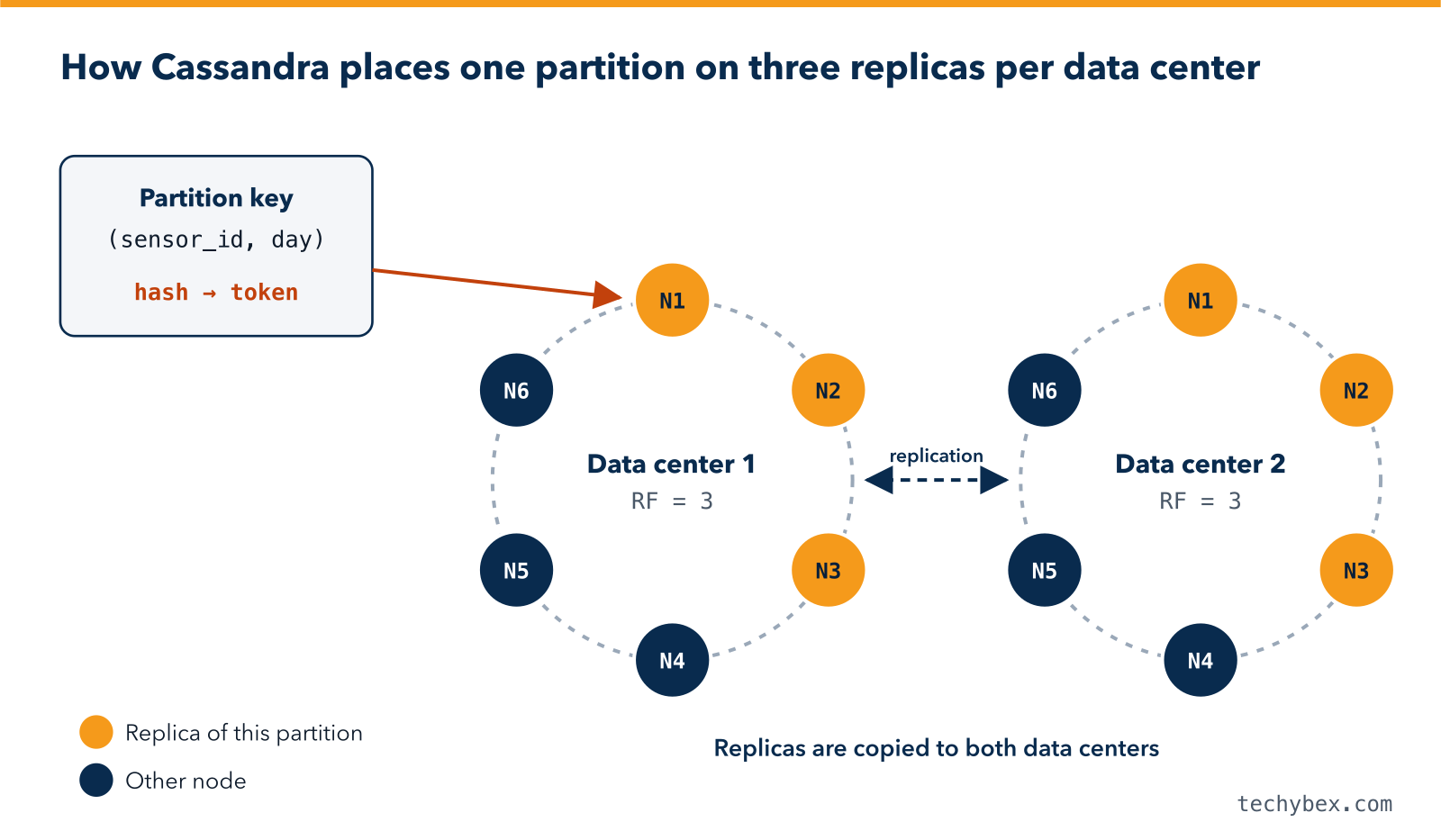
- Partitioning: every row belongs to a partition, identified by its partition key. Cassandra hashes that key to decide which nodes store the partition, which spreads data evenly around the cluster.
- Replication: each partition is copied to several nodes, set by the replication factor. A replication factor of 3 per data center is the common choice.
- Tunable consistency: each query chooses how many replicas must respond, for example ONE, QUORUM, LOCAL_QUORUM or ALL. With a replication factor of 3, using LOCAL_QUORUM for both reads and writes gives strongly consistent results within a data center.
- Fast writes: writes go to a commit log and an in-memory table, then are flushed to immutable files on disk called SSTables. Background compaction merges these files over time.
Because there is no single primary and data is replicated, a Cassandra cluster can keep serving requests while individual nodes, racks or even entire data centers are down.
Where Cassandra Is the Right Choice
Cassandra works best when you have very large volumes of data, a high write rate, predictable query patterns and a need for constant availability.
1. Time-Series and IoT Data
Sensor readings, smart meter data, application metrics and logs arrive continuously and are almost always read by device and time range. Cassandra handles this pattern extremely well, especially with time-window compaction and automatic expiry using TTL (time to live).
2. Messaging, Chat and Activity Feeds
Messaging systems write constantly and read recent messages per user or conversation. Cassandra stores each conversation’s messages together, sorted by time, so reading the latest messages is a single fast lookup.
3. User Profiles, Personalisation and Recommendations
Applications that look up a user’s profile, preferences or recommendations by user ID need low latency at any scale. Cassandra serves these key-based lookups quickly, even across regions.
4. Fraud Detection and Event Tracking
Fraud systems record every login, payment and device event, and need to read an account’s recent history in milliseconds. Cassandra captures the high write volume and returns recent events per account fast.
5. Product Catalogues and Shopping Carts at Scale
Large e-commerce platforms cannot afford downtime during sales. Cassandra keeps catalogue and cart data available even when parts of the infrastructure fail.
6. Globally Distributed, Always-On Applications
When users in several regions must read and write locally, and the application must survive the loss of a whole region, Cassandra’s multi-data-center replication is one of its strongest advantages.
Use case |
Typical partition key |
Why Cassandra fits |
| IoT sensor data | Sensor ID plus day | Very high write rate, time-ordered reads, automatic expiry |
| Messaging | Conversation ID | Constant writes, latest messages read first |
| User profiles | User ID | Fast key lookups at any scale |
| Fraud events | Account ID plus month | High-volume event capture, fast recent-history reads |
| Shopping carts | Cart or session ID | Always available, even during failures |
When Cassandra Is the Wrong Choice
Cassandra is a poor fit when:
- You need joins, ad-hoc queries or complex reporting. Use a relational database or a data warehouse instead.
- You need multi-row ACID transactions, such as a payment ledger that must update several accounts together. Cassandra’s lightweight transactions only cover a single partition and are relatively slow.
- Your data is small. A few hundred gigabytes on one server is usually simpler and cheaper on PostgreSQL or MySQL.
- You frequently update or delete the same data. Deletes create tombstones, which slow reads until they are cleaned up.
- You do not know your queries in advance. Cassandra tables are designed around specific queries.
- Your team has no experience running distributed systems, and you are not planning to use a managed service or partner.
For a broader comparison of database types, read our guide on RDBMS vs NoSQL and which database is best for your needs.
Data Modeling Rules That Matter
Cassandra data modeling works the opposite way from relational design. You start from the queries, not from the entities.
- Design one table per query pattern. Duplicating data across tables is normal and expected.
- Choose a partition key that spreads load evenly. A key with few distinct values creates “hot” nodes.
- Keep partitions bounded. A widely used guideline is to keep partitions well under 100 MB. Add a time bucket, such as day or month, to the partition key for time-series data.
- Use clustering columns to sort rows within a partition, for example by timestamp in descending order.
- Avoid `ALLOW FILTERING` in production queries. Use Storage-Attached Indexes (Cassandra 5.0) for occasional secondary lookups.
Here is an example table for sensor readings, partitioned by sensor and day, newest readings first, kept for 90 days:
CREATE TABLE sensor_readings_by_day (
sensor_id TEXT,
day DATE,
reading_time TIMESTAMP,
value DOUBLE,
PRIMARY KEY ((sensor_id, day), reading_time)
) WITH CLUSTERING ORDER BY (reading_time DESC)
AND default_time_to_live = 7776000;
Running Cassandra in Production
- Repairs: run regular anti-entropy repairs, completing a full cycle within gc_grace_seconds (10 days by default). Skipping repairs can bring deleted data back. Tools such as Cassandra Reaper automate this.
- Compaction strategy: choose based on the workload. Use Size-Tiered for general writes, Leveled for read-heavy tables and Time-Window for time-series data. On Cassandra 5.0, consider the Unified Compaction Strategy.
- Disk headroom: compaction needs free space. Keep enough spare disk for your chosen strategy and alert well before disks fill up.
- Monitoring: watch p99 read and write latency, pending compactions, dropped messages, tombstone warnings and disk usage.
- Backups: use snapshots plus incremental backups, copy them off the cluster, and test restores.
- Upgrades: upgrade one node at a time with a rolling upgrade. If you still run Cassandra 3.x, plan an upgrade to a supported 4.x or 5.0 release.
The official Apache Cassandra documentation covers each of these topics in depth.
Managed and Compatible Alternatives
If you want Cassandra’s data model without running the cluster yourself, options include Amazon Keyspaces (a serverless, Cassandra-compatible service), Azure Managed Instance for Apache Cassandra and DataStax Astra DB. ScyllaDB is a separate database that is compatible with Cassandra’s query language and drivers. Each has compatibility limits and different cost models, so test your workload before committing.
How TechyBex Helps With Cassandra
TechyBex designs, deploys and manages Apache Cassandra and ScyllaDB clusters 24×7. We help you decide whether Cassandra is the right fit, design data models around your queries, and run repairs, compaction, monitoring, backups and upgrades so the cluster stays fast and reliable.
See our Database Managed Services and learn about horizontal and vertical scaling in the cloud.
Is Cassandra right for your workload?
Our database architects review your use case, data volumes and query patterns and send a written recommendation within 2 working days.
Frequently Asked Questions
1. Is Cassandra a SQL or NoSQL database?
Cassandra is a NoSQL wide-column database. Its query language, CQL, looks similar to SQL but does not support joins, and queries must follow the table’s partition and clustering keys.
2. What is the difference between Cassandra and MongoDB?
Cassandra is a masterless wide-column database built for very high write volumes and multi-region availability with predictable queries. MongoDB is a document database with a primary-secondary design and more flexible querying and indexing.
3. How many nodes does a Cassandra cluster need?
For production, at least three nodes per data center. This supports a replication factor of 3 and QUORUM consistency, so the cluster keeps working if one node fails.
4. Is Cassandra good for analytics?
Not directly. Cassandra is optimised for fast operational reads and writes. For analytics, use the Spark Cassandra Connector or copy data into a data warehouse.
In Short
Apache Cassandra is an outstanding database for high-volume, always-on workloads with known query patterns: time-series, messaging, user data, event tracking and global applications. It is the wrong choice for joins, complex transactions and small datasets. Match the workload to the database, model your tables around your queries, and run repairs and monitoring with discipline.