
When an Oracle database slows down, the first instinct is often to add hardware or restart the instance. Both are expensive guesses. Oracle database performance tuning works best as a repeatable method: measure where the time is going, fix the biggest cause, then measure again.
Below is that method, step by step, written for the DBAs who do the work and the IT managers who sign off on it. The techniques apply to Oracle Database 19c and later releases, whether you run on-premises, on Oracle Cloud (OCI) or on AWS and Azure.
Start With the Right Question: Where Is the Time Going?
“The system is slow” is a symptom, not a diagnosis. Before changing anything, narrow the problem down:
- Which business process is slow: a report, a screen, a batch job, or everything?
- Since when? After a release, a data load, an upgrade or a hardware change?
- Is it slow for all users or only some, all the time or only at certain hours?
Oracle measures work as DB time: the total time user sessions spend either on CPU or waiting inside the database. Good tuning reduces DB time for the work your business cares about. Everything else is noise.
Step 1: Measure With AWR, ASH and Wait Events
Oracle records a huge amount of performance data. The trick is reading the right parts.
- AWR (Automatic Workload Repository) takes snapshots of database statistics, every hour by default. An AWR report compares two snapshots and shows the top wait events, the load profile and the SQL statements that used the most time.
- ASH (Active Session History) samples every active session once per second. It is the best tool for short spikes that disappear inside an hourly AWR average.
- ADDM (Automatic Database Diagnostic Monitor) reads AWR data and lists findings with estimated impact.
A licensing note: AWR, ASH and ADDM are part of the Oracle Diagnostics Pack, a separately licensed option for Enterprise Edition. If you do not hold that licence, use Statspack (free) and the V$ dynamic performance views instead. The Oracle Database Licensing Information guide lists exactly what each pack covers.
The “Top Timed Events” section tells you where to look next:
Wait event |
What it usually means |
Where to look first |
| db file sequential read | Single-block reads, usually index lookups | Inefficient index access, large nested-loop joins |
| db file scattered read | Multi-block reads, usually full table scans | Missing indexes, stale statistics |
| log file sync | Sessions waiting for commits to be written | Commit frequency in the application, redo disk latency |
| enq: TX – row lock contention | Sessions blocked by another session’s row lock | Application locking pattern, long uncommitted transactions |
| library cache / cursor: mutex waits | Heavy parsing | Missing bind variables, hard parsing |
| DB CPU | Sessions busy on CPU | Expensive SQL with high logical reads |
Step 2: Tune the SQL That Matters Most
In most Oracle systems, a handful of SQL statements consume most of the resources. Start with the “SQL ordered by Elapsed Time” and “SQL ordered by Gets” sections of the AWR report and work down the list.
For each statement:
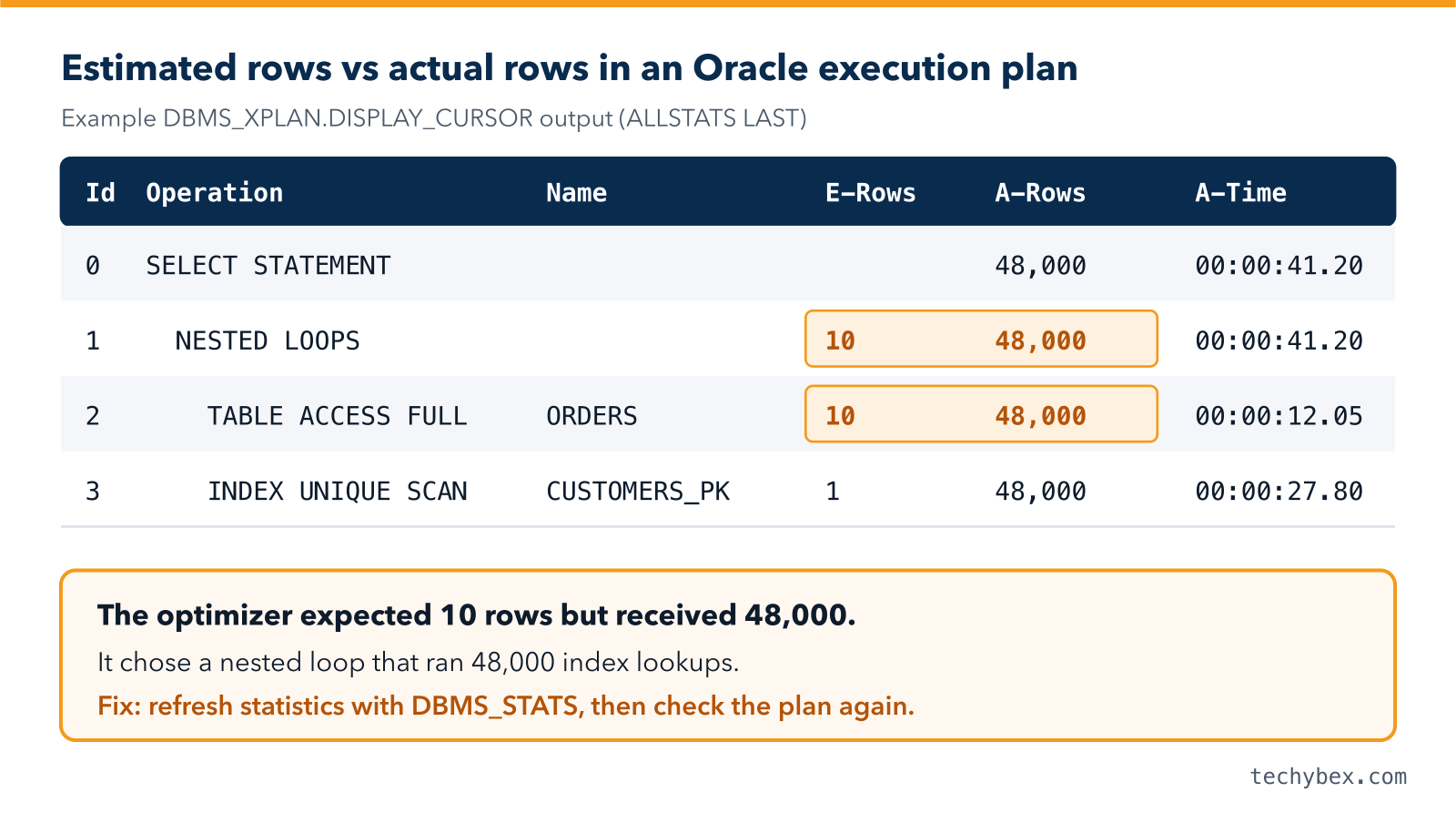
- Get the actual execution plan, not just the estimated one. Run the query with the GATHER_PLAN_STATISTICS hint and display it with DISPLAY_CURSOR using the ALLSTATS LAST format.
- Compare estimated rows (E-Rows) with actual rows (A-Rows). A large gap means the optimizer is working from bad information, usually statistics.
- Look for the expensive step: full scans of large tables when only a few rows are needed, nested loops over millions of rows, or sorts that spill to temporary space.
- Fix the cause: rewrite the predicate, add or change an index, or correct the statistics.
- Lock in good plans with SQL Plan Management (SQL plan baselines) so a future statistics change cannot silently switch to a worse plan.
Use Bind Variables
SQL that embeds literal values (WHERE customer_id = 1042) forces Oracle to hard-parse every variation. Under load, this shows up as shared pool and mutex contention. Bind variables (WHERE customer_id = :id) let Oracle reuse one cursor. If you cannot change the application quickly, CURSOR_SHARING = FORCE is a short-term workaround, not a fix.
Avoid Patterns That Block Index Use
- Functions on indexed columns, such as WHERE TRUNC(order_date) = :d. Rewrite as a range, or create a function-based index.
- Implicit data type conversion, such as comparing a VARCHAR2 column with a number.
- Leading wildcards, such as LIKE ‘%smith’.
Step 3: Keep Optimizer Statistics Accurate
The cost-based optimizer is only as good as its statistics. Stale or missing statistics are behind a large share of sudden plan changes.
- Confirm the automatic statistics job runs successfully in its maintenance window.
- Gather statistics manually after large data loads or purges with GATHER_TABLE_STATS.
- Use histograms on columns with skewed data, such as a status column where 95% of rows are “CLOSED”.
- Use incremental statistics on large partitioned tables so Oracle does not rescan every partition.
- Use DBMS_STATS, not the old ANALYZE command, for optimizer statistics.
Step 4: Get Indexing Right
Indexes speed up reads but slow down every insert, update and delete. Aim for the right indexes, not the most indexes.
- Index the columns used in selective filters and joins.
- In composite indexes, put the columns used with equality conditions first.
- Use invisible indexes to test the effect of dropping an index before you actually drop it.
- Track which indexes are used with DBA_INDEX_USAGE (Oracle 12.2 and later) and remove the ones that never are.
For very large tables, consider partitioning, which lets queries skip entire partitions. Partitioning is a separately licensed Enterprise Edition option.
Step 5: Size Memory and Redo Correctly
- SGA and PGA: the SGA holds the buffer cache and shared pool; the PGA handles sorts and hash joins. Use the built-in advisors (V$SGA_TARGET_ADVICE, V$PGA_TARGET_ADVICE) to see the expected benefit of more memory before adding it.
- HugePages on Linux: for large SGAs, configure HugePages and use Automatic Shared Memory Management (SGA_TARGET). Automatic Memory Management (MEMORY_TARGET) is not compatible with HugePages.
- Redo logs: frequent log switches cause checkpoint waits. A common target is a log switch every 15 to 20 minutes at peak load. Place redo logs on your lowest-latency storage.
Step 6: Check Storage and the Operating System
Sometimes the database is the victim, not the cause.
- In AWR, check the average wait for “db file sequential read”. On flash storage this should be low single-digit milliseconds. Consistently higher numbers point to a storage problem.
- Make sure the server never swaps memory to disk.
- Watch the CPU run queue. If it is regularly longer than the number of cores, the server is CPU-bound.
- On Oracle RAC, check interconnect latency and “gc” wait events.
Step 7: Prevent Performance Regressions
Tuning is not a one-time project. Protect the gains:
- Keep AWR baselines for normal business periods and compare against them after every release.
- Test changes against production-sized data, not a small copy.
- Use SQL Plan Management for critical queries.
- Alert on rising DB time and new top wait events, not just on CPU and disk.
Common Oracle Tuning Mistakes to Avoid
- Changing many initialization parameters at once, so nobody knows which change helped.
- Adding an index for every slow query without checking the impact on writes.
- Flushing the shared pool or buffer cache in production as a “fix”.
- Buying more CPU before checking the cause. Oracle is licensed per processor, so extra cores can also raise licence costs.
- Tuning without a baseline, so there is no way to prove improvement.
How TechyBex Helps With Oracle Performance
TechyBex DBAs manage and tune Oracle databases 24×7 for businesses across India and the Middle East. We read your AWR or Statspack data, find the statements and settings that cost you the most, and fix them in agreed change windows. We also handle RAC, Data Guard, upgrades and licence-aware architecture.
Learn more about our Database Managed Services and Database Optimization and Consolidation, or read how hidden costs grow as your database grows.
Get a free Oracle performance health check
Our senior DBAs review your AWR or Statspack reports and send you a written report with clear priorities
within 2 working days. No cost, no obligation.
Frequently Asked Questions
1. How often should Oracle database performance tuning be done?
Monitor performance continuously, review it formally every month, and run a focused tuning exercise after every major release, upgrade or large jump in data volume.
2. Can I tune Oracle without the Diagnostics Pack licence?
Yes. Statspack, the V$ performance views and DBMS_XPLAN are available without the Diagnostics Pack and cover most tuning work. You lose AWR, ASH and ADDM convenience, not the ability to tune.
3. Will more CPU or memory fix a slow Oracle database?
Only if CPU or memory is the actual bottleneck. Most slowdowns come from a few inefficient SQL statements, poor statistics or locking. Fix those first. Remember that Oracle licensing is tied to processor cores.
4. What is the difference between AWR and ASH?
AWR stores hourly snapshots of totals and averages, which is ideal for trends and comparisons. ASH samples active sessions every second, which is ideal for diagnosing short spikes and individual sessions.
The Short Version
Oracle database performance tuning is a cycle: measure, find the biggest cause, fix it, and measure again. Start with wait events and top SQL, keep statistics accurate, index with purpose, and protect your gains with baselines and plan management. Do that consistently and most “slow database” problems disappear before users notice them.